AI Photo Video Maker, Enhancer
- 4.7
- Rating
- 10.00M
- Installs
- Free
- Price

 Analysis by App-foxy
When I tried AI Photo Generator, Enhancer, I found that its most useful role is not replacing a full photo editor. It is a quick rescue tool for pictures that feel too soft, too old, or simply not interesting enough to share. The app sits in the photography category and combines enhancement with playful AI effects, including cartoon-style treatments and photo-to-video results. That mix makes it more flexible than a basic sharpness filter, although it also means the experience can feel less focused than a traditional editing app.
The main appeal is speed. Instead of spending time adjusting exposure, contrast, color, and detail separately, I could start with one image and let the app create a more polished version. The developer is Smart AI DEV, and the app is free to install for everyone. It works on devices running Android 6.0 or later, which makes it accessible even if you are using an older phone. The current version is 1.5.1, and its 4.4 average from around 108 thousand ratings suggests that the quick-result approach works well for a large audience.
The strongest reason to try it is simple: it can turn an ordinary or damaged-looking photo into something more presentable without demanding editing experience. I would not treat every result as a perfect restoration, but I can see why the app has passed over 10 million installs. It is aimed at people who want a visible change quickly, rather than photographers who need complete control over every pixel.
You May Also Like

 Blood Strike: 2.5 Anniversary
Blood Strike’s Loadouts Turn Every Drop Into a Tactical Gamble
A close look at Blood Strike’s custom loadouts: how fast access to signature weapons reshapes its battle royale rhythm, rewards preparation, and narrows the gap between fights.

 Pandora - Music & Podcasts
Pandora’s Music Is Easy to Start, but Harder to Recover
Pandora’s strength is its low-effort path from a seed to a station. Its weak spot is how much confidence it asks you to place in connection, setup, and quiet recovery.

 8 Ball Pool
 Is Built on Rivalries, Rematches, and Routine
A close look at the rivalries, rematches, shared routines, and unanswered safety questions that turn a quick pool match into a persistent mobile community.

 Samsung Music
’s Quiet Strength Is Playing What You Already Own
Its reach comes less from spectacle than from dependable access to a personal library. That simplicity is both the app’s strongest retention engine and its ceiling.

 AccuWeather: Weather Radar
AccuWeather Review: A Quick, Clear Forecast for Everyday Decisions
For everyday plans, the best forecast is the one you can understand quickly. AccuWeather makes rain timing, radar, and local conditions easy to act on, with a few trade-offs.

 Hill Climb Racing
Why Hill Climb Racing Still Turns Crashes Into One More Run
A tiny car, a bumpy hill and one more upgrade: Hill Climb Racing keeps resurfacing because its simple chaos makes every near-miss feel personal.
More From Our News Desk



What the enhancement actually changes in everyday use
I focus here on the part that matters after choosing a photo: whether the enhancement makes it more useful without making it feel unlike the moment I remember. I find it helps to decide what the image is for before processing it—a keepsake, a profile picture, or a playful post—because each purpose calls for a different balance. That practical distinction leads naturally to the next section.
A fast improvement rather than a full restoration studio
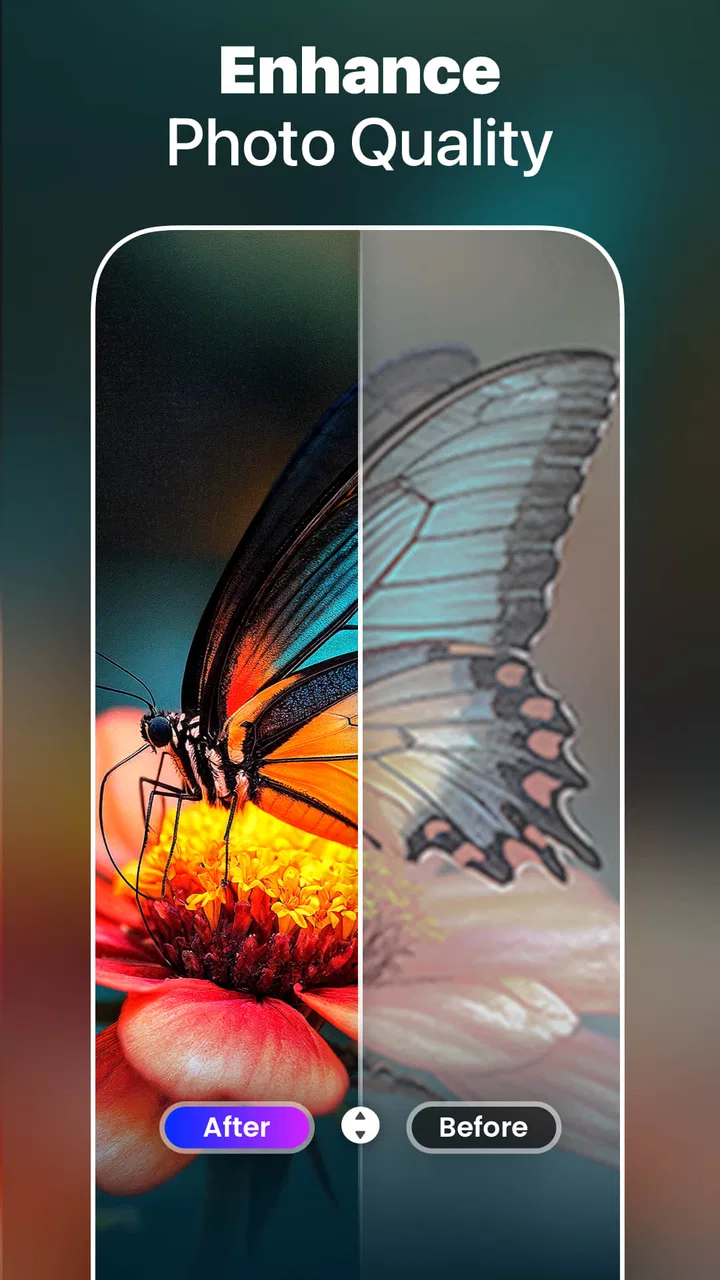
The enhancement function is most convincing when the original image already contains useful information. A slightly blurry portrait, an older family picture, or a photo that looks flat after being taken indoors can benefit from a stronger, cleaner presentation. The app is especially convenient when I want to make one image more usable for a profile picture, a social post, or a message to relatives.
There is an important distinction between improving an image and recovering details that were never captured. AI processing can make edges look more defined and can produce a more coherent-looking result, but it cannot reliably recreate the exact texture of a face, fabric, or background from a badly damaged source. In my experience, the best results come from photos that are imperfect but still recognizable. If the original is extremely tiny, heavily compressed, or badly out of focus, I would inspect the result carefully before treating it as a faithful restoration.
This is where the app differs from a conventional editor. A usual editor gives me sliders and expects me to decide how much sharpening or correction is appropriate. AI Photo Generator, Enhancer is more immediate: I provide the image, choose the kind of transformation I want, and judge the finished version. That saves time, but it also reduces precision. If you enjoy adjusting highlights, shadows, curves, masks, and selective color, a dedicated editor remains the better choice.
Why the before-and-after check matters
AI enhancement can make a photo look more impressive at first glance while quietly changing small details. I recommend comparing the processed image with the original at a larger viewing size, especially around eyes, hair, lettering, jewelry, and straight architectural lines. These areas reveal whether the app has genuinely improved the picture or merely made it look more artificial.
A useful workflow is to keep the original untouched, apply the enhancement, and then view both images after a short break. The first version may seem dull simply because it is familiar, while the processed one may seem exciting because it is stronger. Looking again later helps me decide whether the result still feels natural. This small habit is more valuable than repeatedly applying the same effect.
I also avoid using the strongest-looking treatment automatically. A moderate correction often works better for family portraits, where natural skin and recognizable expressions matter. More dramatic processing can be enjoyable for avatars or creative posts, but it is less suitable when the purpose is to preserve a memory accurately.
From correction to creative transformation
The app is not limited to making pictures cleaner. Its cartoon effects give the same source image a different identity, while its ability to turn photos into videos adds movement to a still image. These options make it feel more like a small creative playground than a single-purpose restoration utility.
That variety is useful when I have one picture but several possible goals. I might enhance a family photograph for a private album, create a cartoon version for a profile image, and experiment with a video-style result for a social post. The important point is that these are different creative decisions. Enhancement tries to make the source more convincing; a cartoon treatment intentionally changes its visual language; a video result changes how the image is presented over time.
Because of that difference, I would not judge every output by the same standard. A natural-looking enhancement should be checked for believable detail. A cartoon effect should be judged by whether it has a pleasing style. A photo-to-video result is better evaluated by whether it gives a still image enough visual interest to share. Understanding that distinction prevents disappointment when a playful transformation does not resemble the original closely.
How I would use it for an old family picture
Imagine finding a faded photograph in a phone gallery after a family gathering. It is recognizable, but the faces look soft and the colors are weak. I would first make a duplicate or keep the original safely stored, then use the enhancement on the copy. After processing, I would zoom in on the faces and compare the overall color and sharpness with the source. If the result looks natural, I would use it for a digital album or send it to relatives.
If the enhanced version introduces strange facial details, I would not keep pushing it. Instead, I would try a lighter-looking result if available through the app’s workflow, or use the original with a simple crop. For a sentimental photograph, authenticity is more important than maximum sharpness. The app is helpful in this scenario because it lowers the effort needed to produce a cleaner copy, but it should support my judgment rather than replace it.
Where the creative effects fit better
The cartoon side is more appropriate when accuracy is not the priority. A casual selfie can become a playful avatar, and a picture of a pet or a travel moment can take on a more illustrated appearance. I would use these effects for messaging, social profiles, and personal experiments rather than official documents or serious family archiving.
The photo-to-video option is also useful when a single image needs to feel more active in a feed. A still birthday photo, a travel snapshot, or a picture prepared for a short social update can gain more attention when presented as a moving result. Still, I would remember that a transformation like this is designed for presentation, not for preserving the original photograph in its most accurate form.
One practical tip is to choose the source image according to the output. For enhancement, select a clear image with visible facial or object detail. For cartoon effects, a simple composition with a distinct subject usually gives the style less visual clutter to interpret. For a video result, an image with a strong focal point works better than a crowded group scene. The same photo does not have to be ideal for every mode.
The trade-off between convenience and control
The biggest advantage is also the main limitation. The app makes a decision for me, which is convenient when I want a result quickly, but frustrating when the output is almost right and I want to correct one specific area. A traditional editor may take longer, yet it lets me decide exactly how much sharpening, cropping, or color adjustment belongs in the final image.
I would also be cautious with images where small details carry factual meaning. Photos of receipts, signs, documents, product labels, or historical objects should not be treated as reliable simply because an AI-enhanced version looks clearer. A visually clean result can still contain altered details. For those situations, I would preserve the original and use the app only as a viewing aid, not as evidence.
Another consideration is the pricing model. The app is free, but optional in-app purchases range from $4.99 to $79.99 per item. That wide range means I would explore the free experience first and pay only after deciding that the particular workflow is valuable to me. Someone who edits only an occasional picture may find the free access sufficient, while a frequent user should examine the purchase screen carefully before committing to anything.
What the audience size tells me—and what it does not
With over 10 million installs, the app is clearly easy for many people to discover and use. Its Everyone age rating also makes it suitable for a broad audience, including casual users who are not looking for professional photography software. The large user base gives me confidence that the basic concept is approachable, but popularity does not guarantee that every image will produce a convincing result.
The rating of 4.4 is encouraging rather than perfect, which matches my impression of the app. It can deliver satisfying transformations, especially when the source image is reasonably usable, but AI image processing always involves compromises. The experience is strongest when I accept it as a quick creative assistant. It is weaker when I expect exact restoration, professional retouching, or complete manual control.
Who should use it and who should skip it
I would recommend this app to someone who wants to improve old snapshots, prepare a quick profile image, experiment with cartoon versions, or make a still photograph more engaging. It is particularly suitable for people who find conventional editing panels intimidating. The short path from image selection to visible transformation is its clearest strength.
It also suits families who want to refresh casual pictures without learning a complicated workflow. A parent preparing a few photos for a private album, a traveler cleaning up a dim snapshot, or a student creating a playful avatar can get useful value from it. The app’s broad age rating and older Android compatibility make it a practical option for shared household devices as well.
I would skip it if my priority were professional color management, precise retouching, batch organization, or dependable document reconstruction. In those cases, a full photo editor or a specialized scanning and restoration tool would be more appropriate. I would also choose another option if I dislike stylized AI results or want every adjustment to remain visibly under my control.
My final take on the free download
AI Photo Generator, Enhancer works best when I treat it as a fast first step: improve a usable image, try a creative variation, compare the result with the original, and keep only what genuinely looks better. Its enhancement capability can save time and make neglected photos more shareable, while the cartoon and video options give it extra appeal beyond basic correction.
It is not a replacement for a serious editor, and I would not trust an AI-generated improvement as an exact record of a damaged image. The optional purchases also deserve a careful look before spending money, especially for occasional users. Even with those reservations, the free starting point makes it easy to test on a few personal photos.
My recommendation is strongest for casual photographers who want visible results without a technical learning curve. If that describes you, this photography app is worth trying on a copy of an old portrait, a soft selfie, or a still image that needs a more playful presentation. Use it for convenience and experimentation, but keep the original and let your own eyes make the final decision.
FAQs for AI Photo Video Maker, Enhancer
01What features does the AI Photo Generator, Enhancer offer?
The AI Photo Generator, Enhancer provides a range of features including photo enhancement, style transfer, and background editing. Users can apply filters to transform images, enhance color and clarity, and generate art-style photos using AI algorithms. It also supports high-resolution editing for professional-quality results.
02Is the AI Photo Generator, Enhancer easy to use for beginners?
Yes, the app is designed with an intuitive interface suitable for all users, including beginners. It offers step-by-step guides and tooltips to help users navigate through its features. The AI-driven enhancements are largely automated, allowing users to achieve impressive results with minimal effort.
03Are there any in-app purchases or subscriptions required?
The AI Photo Generator, Enhancer is free to download, but it offers in-app purchases for advanced features and functionalities. Users can opt for a subscription model to access premium tools and remove ads, enhancing their editing experience. It's advisable to review these options based on your needs.
04What devices are compatible with the AI Photo Generator, Enhancer?
The app is available for both Android and iOS devices. It requires an operating system of Android 5.0 or later and iOS 11.0 or later. Ensure your device meets these requirements for optimal performance. The app is optimized for both smartphones and tablets, providing flexibility in usage.
05How does the AI Photo Generator, Enhancer ensure user privacy?
The app is committed to user privacy, employing encryption to protect personal data and photos. It does not store images on its servers without user consent. Users are encouraged to review the app's privacy policy for detailed information on data handling and to adjust settings as needed.
Pros
- User-friendly interface for easy navigation.
- Quick photo processing with impressive results.
- Wide range of filters and styles available.
- Supports high-resolution outputs for prints.
- Regular updates with new features and improvements.
Cons
- Some features require a paid subscription.
- Occasional lag on older devices.
- Limited offline functionality.
- Ads can be intrusive in free version.
- Requires a stable internet connection.

AI Photo Video Maker, Enhancer
Gallery